Underwriting of a property: income, debt, returns, scenarios. It is the single most-requested job we have — it appears in 28.6% of working conversations, whether or not people reach it through this named product.
How to run it
Give an address. Optionally give a playbook, and choose single-asset or at-scale mode.
Documents matter here more than almost anywhere: a T-12 and a rent roll move the answer from public-data inference to the asset's own numbers. Without them you get an underwriting built on what the county knows, which is a different and weaker thing.
What comes back
A canvas report with the underwriting on effectively every run. No deck.
Median cost is under a credit, but the 90th percentile reaches 14 — the spread is wide because the work is.
Your assumptions ride with every underwriting
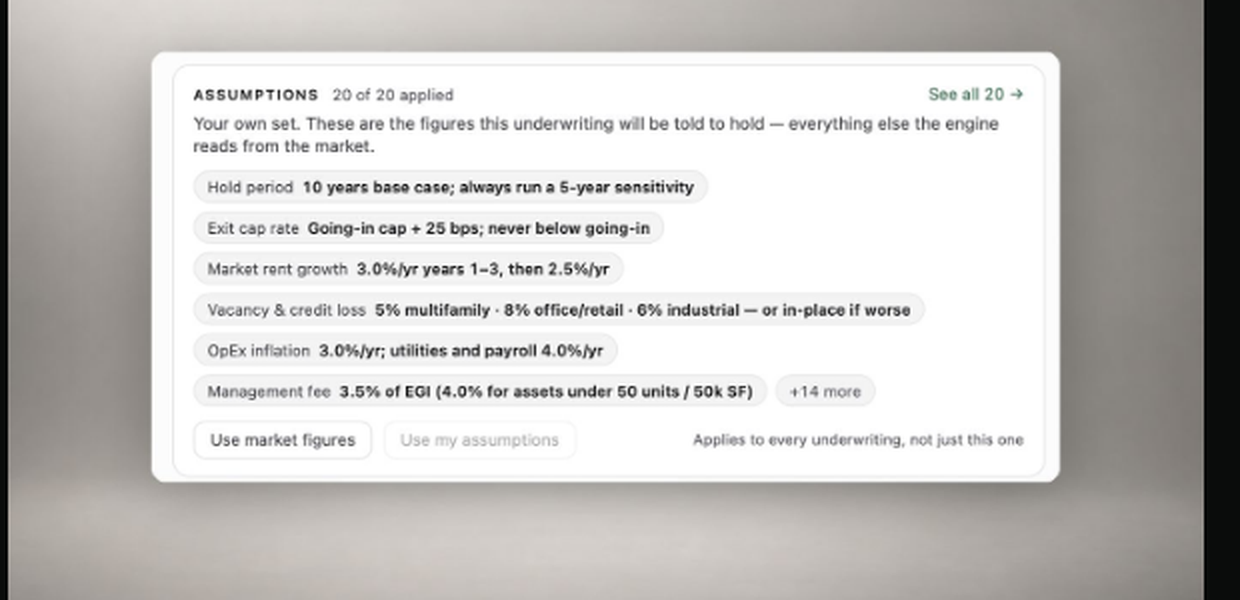
This is the single thing that most changes what comes back, and almost nobody uses it: the Assumptions tab holds your house standards — hold period, exit cap rate, rent growth, vacancy and credit loss, OpEx inflation, management fee, and about fourteen more — and the engine appends them to every underwriting you run, not just the next one.
Two things worth knowing before you press Start:
- The set is per person, not per run. Changing a line here changes every future underwriting. There is no per-run override, and the interface says so rather than offering a switch that quietly rewrites the rest.
- "Market figures" is a real branch, not a label. Switch every line off and the engine underwrites from its own market reads instead of your standards.
Four people have ever set their own. Everyone else is running on the shipped defaults — which are reasonable, and are not yours. If your firm has a house view on exit cap or vacancy, twenty minutes in that tab is worth more than any other twenty minutes you will spend here.
Do
- Send the T-12 and the rent roll. Everything else on this page is secondary to that.
- Set your assumptions once, then check the strip under the Playbook picker before you start — it shows which ones are about to be applied and whether they are yours or the defaults.
- State the debt assumptions you want tested. Leverage, rate, term, amortisation — if you do not state them, they are inferred, and an inferred capital stack is the fastest way to a number you cannot defend.
- Say which mode you want. Single-asset and at-scale produce different work from the same address.
Do not
- Do not expect a workbook. This product does not produce one. If you need a model you can open, run Value Opinion (workbook on 73% of runs) or Excels.
- Do not assume local tax or tenure rules are applied. They are not, in any country — state the ones that matter in the brief. See Coverage and data.
- Do not read a thin income section as a weak asset. It usually means we were underwriting from public data because no documents arrived.
- Do not assume the figures were your house standards. Unless you have set them, they are the shipped defaults — and four people in total have set their own. Check the strip rather than the output.